Learn how to transform inspiration into a new Seed and become part of The Inspiration Tree’s growing creative genealogy.
Creating a Seed is different from publishing on most creative websites.
You’re not starting with a blank page. You’re continuing a conversation that has already begun.
Every Seed on The Inspiration Tree grows from another published Seed. Your contribution may take the idea in a completely different direction, but it always remains connected to the work that inspired it. That connection is what allows visitors to explore not only individual creations, but the creative journey that links them together.
The submission process is actually very simple, and you may be able to complete it without this long documentation. This guide, however, may give you more insight and documentation if/when there are questions that arise. The short answer to how to create a new Seed (contribution) is to go to an existing Seed (main Seed list), once you choose one, find the “Create Something Inspired” button, and follow the submission wizard.
If questions arise, this document is designed to guide you through that journey one step at a time.
By the time you publish, you’ll have created more than a creative work. You’ll have added another branch to an ever-growing genealogy of ideas.
Before You Begin
Unlike most creative communities, you don’t begin by creating a new post for the site. You begin by choosing one existing Seed that genuinely inspired and/or relates to what you’re about to create, or have already created and want to post/share.
Every member-created Seed grows from another published Seed. When you’re ready to contribute, you’ll find the Create Something Inspired button at the bottom of the Parent Seed’s page. Clicking that button begins the submission process and automatically connects your new Seed to the one that inspired it.
Think of it this way: you’re not submitting your work to the site and community as a whole. You’re submitting it to one specific Seed, continuing a creative conversation that has already begun.
Choosing the right Parent Seed is one of the most important decisions you’ll make. The goal isn’t to find a Seed that matches your work exactly. The goal is to find the Seed that genuinely sparked the idea, question, feeling, or perspective that led you to create something new.
If you haven’t found that Seed yet, spend some time exploring the community. Browse the newest contributions, discover what’s trending, search by title or keyword, explore different creative disciplines (Article, Audio, Fiction, Imagery, Poetry, Video, What If, Other), or simply follow existing creative genealogies to see where other ideas have led. One discovery often leads naturally to another.
Remember that The Inspiration Tree isn’t just preserving creative works. It’s preserving how creativity evolves. Every time one Seed inspires another, the site records another step in that journey, allowing future visitors to trace the remarkable paths that ideas take as they pass from one creator to the next.
Tip: If you’re having difficulty explaining how your work connects to its Parent Seed, you may not have found the right one yet. Keep exploring. When you’ve found the Seed that truly inspired your creation, the connection usually feels natural rather than forced.
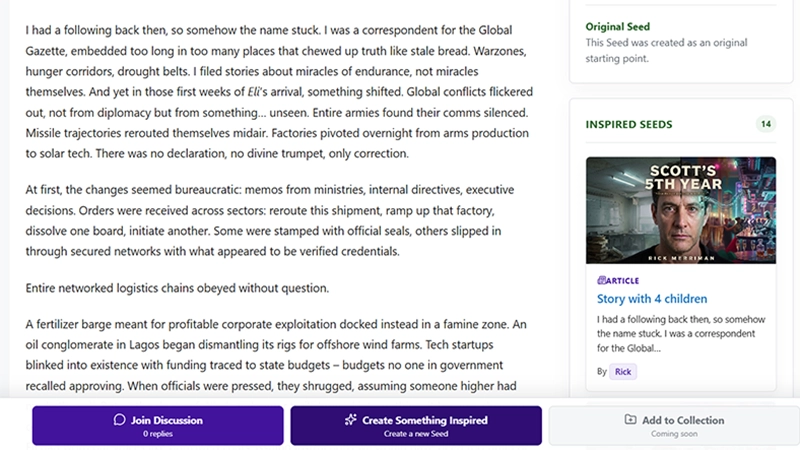
Every new Seed begins by clicking Create Something Inspired on an existing published Seed.
Step 1 – Confirm Your Inspiration

After clicking Create Something Inspired, you will get to the first step of your submission. There is nothing to fill in for the first step. The first screen confirms which Parent Seed inspired your creation.
The Parent Seed is assigned automatically and cannot be changed. Every Seed has exactly one parent, allowing the site’s creative genealogy to remain clear and easy to explore. If the parent Seed shown is not what you are wanting to submit to, go back to the main site and find the Seed you want to submit to and begin the process again
Step 2 – Choose the Best Way to Express Your Idea
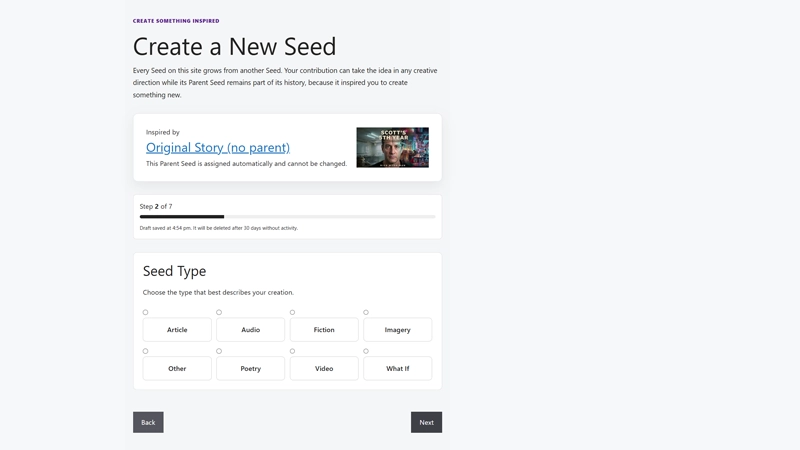
The next step is choosing the Seed Type that best describes what you’re creating. This is what your prrimary content is about.
Think of Seed Types the same way you would think about categories in a blog or filing folders in a library. They don’t determine what your work is about. Instead, they help organize the community and make it easier for other visitors to discover the kinds of creative work they’re interested in exploring.
Choose the Seed Type that best matches the finished work, not necessarily the idea behind it.
For example, if a story inspires you to paint a scene, your Seed Type should be Imagery, not Fiction. If a photograph inspires you to write an essay, your Seed Type should be Article. The Parent Seed preserves the creative connection. The Seed Type simply describes the kind of work you’re contributing.
Don’t spend too much time worrying about making the perfect choice. Select the type that most accurately represents your submission today. If you later decide another Seed Type is a better fit, you can edit your Seed after it has been published.
The Current Seed Types
Article
Articles are intended for nonfiction writing. They may explain an idea, present an opinion, explore a topic, teach a skill, or examine a concept inspired by another Seed. Examples include essays, editorials, Scientific or factual papers, Philsophical views, educational articles, reviews, commentaries, and personal reflections.
Audio
Audio Seeds communicate ideas through sound rather than text or images. Examples include music, spoken-word performances, podcasts, narrations, dramatic readings, ambient soundscapes, or other original audio works.
Fiction
Fiction Seeds tell an imagined story inspired by another Seed. They may be short stories, flash fiction, serialized fiction, alternate endings, prequels, sequels, character studies, or stories that explore a different perspective within the same idea.
Imagery
Imagery Seeds communicate primarily through visual art. Examples include digital art, traditional artwork, paintings, illustrations, concept art, photography, comics, graphic design, 3D renders, maps, photomanipulation, and other still visual creations.
Other
Some creative works don’t fit neatly into the other categories. Choose Other only when none of the available Seed Types accurately describes your submission.
Poetry
Poetry Seeds use verse to express an idea, emotion, observation, or interpretation inspired by another Seed. This includes traditional poetry, free verse, spoken-word poetry presented as text, and other poetic forms.
Video
Video Seeds combine moving images with sound or narration. Examples include short films, documentaries, animations, motion graphics, cinematic edits, video essays, or other original video productions.
What If
“What If” Seeds present an original speculative question designed to inspire further creativity. Rather than telling a complete story, they introduce a compelling possibility for others to explore. Examples include questions such as What if artificial intelligence became more compassionate than humanity? or What if the last place humans could live was beneath the ocean?
Tip: Focus on the kind of work you’re creating today, not the Seed that inspired it. The Parent Seed records where your idea came from. The Seed Type tells other visitors what they’re about to experience.
Step 3 – Give Your Seed a Title
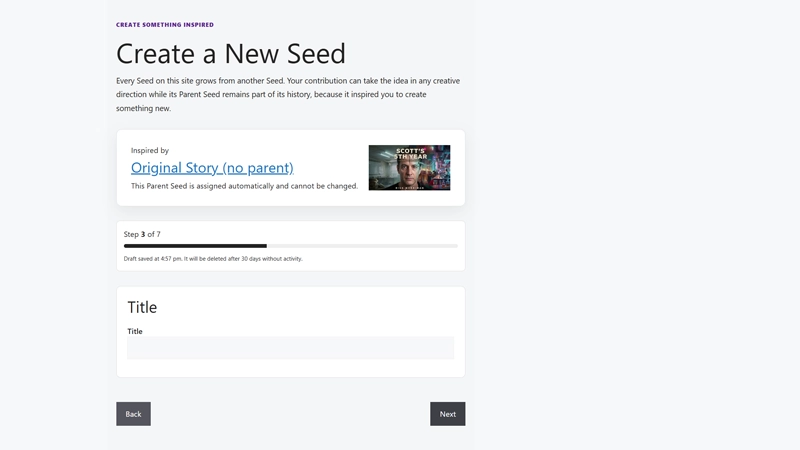
Your title is one of the most important decisions you’ll make. But don’t stress it too much at this point. You will have the chance to go back and change it or anything else after final review and actual submission.
Long before someone experiences your creative work, they’ll usually encounter its title. It appears throughout this site in discovery lists, search results, creative genealogies, category pages, and creator profiles. After your Seed is indexed by Google and other search engines, the title is often the first thing potential visitors will see there as well. If you or someone else shares your Seed on social media, the title typically becomes the headline that encourages people to click.
In other words, your title is often the first opportunity your work has to capture someone’s attention.
Remember that you’re not only naming your creative work. You’re also naming the beginning of a new branch in the site’s creative genealogy. Long after someone has forgotten who created a particular Seed, they may remember its title as they follow that branch through generations of inspired creations.
Your title doesn’t need to reference the Parent Seed unless you want it to. Some creators enjoy using a title that immediately hints at the connection, while others prefer to let visitors discover that relationship naturally as they explore the genealogy. Both approaches are equally valid. The creative connection is preserved by the Parent Seed and your Inspiration Statement, not by the title itself.
A good title creates curiosity without being misleading. It gives visitors a reason to explore while allowing the creative work itself to deliver the experience. Try to avoid titles that explain everything or rely on internal references that only you understand.
Think about the kind of title that would make you stop scrolling and click to learn more.
That doesn’t necessarily mean it needs to be dramatic or mysterious. Sometimes the strongest titles are simply clear, memorable, and intriguing enough to invite exploration.
Don’t let the search for the “perfect” title prevent you from moving forward. Your title can always be refined later as your Seed evolves or after you’ve had time to reflect on how well it represents your work.
Tip: Before continuing, imagine seeing your title in a list of twenty other Seeds. Would it make you curious enough to click? If not, spend a few more minutes experimenting. A stronger title can significantly increase the number of people who discover not only your Seed, but the creative genealogy that begins with it.
Your Next Step Depends on Your Seed Type
Up to this point, every creator has followed the same submission process. Now the wizard branches based on the primary content of the Seed you’re creating.
This choice was made in the previous step when you selected your Seed Type. If you chose a written Seed Type such as Article, Fiction, or Poetry, your next step will be entering the written content that forms the heart of your submission. If you selected a non-written Seed Type such as Imagery, Audio, or Video, (media not prose) you’ll instead upload or link to the creative work that represents your idea.
If you realize you selected the wrong Seed Type, don’t worry. Simply click Back, choose a different Seed Type, and continue. Everything you’ve entered so far is preserved. Each time you move from one step to the next, your submission is automatically saved as a draft, allowing you to move backward and forward through the wizard without losing your work.
Choose the version of Step 4 below that matches the primary content of your Seed. Both paths come together again at Step 5 – About This Seed, where every creator explains the inspiration behind their work.
Step 4A – Share a Written Seed

If you selected Article, Fiction, Poetry, or another written Seed Type, this is where your creative work comes to life.
You can write directly in the editor or paste original work you’ve already written elsewhere. During Alpha, Written Seeds can contain up to 10,000 words, making the editor suitable for everything from a short poem or article to a substantial short story, essay, or even a chapter from a longer work.
The purpose of this step is simple: create the primary content of your Seed. Focus on expressing the idea, question, feeling, or perspective that inspired you to create. Don’t worry about explaining why the Parent Seed inspired your work just yet, about you the contributor, or other information about the seed, or other information you want to include that is not the primary contribution/content. The next step, About This Seed, is specifically designed for that purpose.
Using the Editor
The editor intentionally provides the formatting tools most creators need without overwhelming you with unnecessary complexity. You can create paragraphs, add Heading 2 and Heading 3 section headings, apply bold or italic formatting, create bulleted and numbered lists, insert block quotations, add hyperlinks, and undo or redo changes.
By keeping the editor simple, the focus remains where it belongs: on your writing rather than complicated formatting.
Adding Images
The Add Media button allows you to upload new images or insert images you’ve previously uploaded to the site. Images can be used to illustrate, complement, or enhance your written work without interrupting the reading experience.
During Alpha, the following limitations apply:
- Images must be JPG, PNG, or WebP format.
- Images must be 1 MB or smaller.
- Images are displayed centered within the written content.
- Only image files may be inserted into Written Seeds.
- Custom HTML, JavaScript, embedded code, unsupported media, and other file types are not permitted, are checked for, and will not result in a successful submission.
These limitations are intentional. They help keep pages loading quickly, maintain a consistent reading experience across all devices, and protect both the site and its visitors from unsupported or potentially unsafe content.
If you discover that your submission would be better presented as an Audio or Video Seed, simply click Back until you return to Step 2 – Select the Seed Type for Your Submission. Choose the Seed Type that best matches the primary content of your work, then continue through the submission process. Because your submission is automatically saved as a draft each time you move to a new step, you won’t lose the work you’ve already entered while making the change.
Before Moving On
As you write, you’ll notice a live word count beneath the editor. Use it as a guide rather than a goal. Some ideas are best expressed in a few hundred words, while others deserve considerably more space. Focus on communicating your idea clearly rather than writing to a specific length.
Don’t feel pressured to make everything perfect before continuing. Every time you move from one step to the next, your submission is automatically saved as a draft. You can return to this editor at any time before publishing, and even after your Seed has been published, you can continue refining and improving your work.
Tip: Most visitors decide within the first few paragraphs whether they’ll continue reading. Before clicking Next, read your opening as though you’re encountering it for the first time. Does it make you curious enough to keep going? A compelling opening not only encourages people to read your work, it also increases the chances that another creator will one day be inspired to continue the creative genealogy with a Seed of their own.
Step 4B – Share a Visual, Audio, or Video Seed
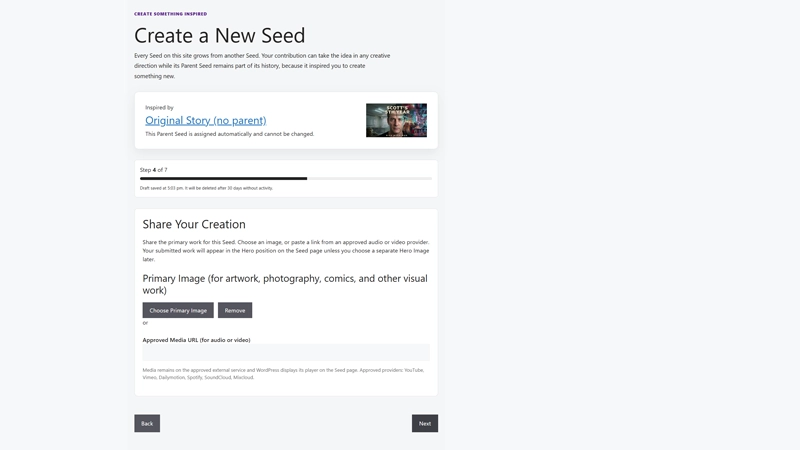
If the primary content of your Seed isn’t written, this is where you’ll provide the creative work that visitors will experience.
Unlike a Written Seed, you’ll normally do one of two things during this step:
- Upload a Primary Image for visual works, or
- Enter the URL for an approved Audio or Video provider.
Which option you use depends entirely on the type of Seed you’re creating.
Visual Seeds
If you’re submitting artwork, photography, digital art, illustrations, concept art, comics, or another visual creation, upload your Primary Image.
This image becomes the main content of your Seed and, by default, appears immediately beneath your title when visitors view your published Seed.
Choose the highest-quality version of your work that you have available. This should be the actual creative work, not a promotional graphic, collage, or advertisement. For many visitors, this image will determine whether they continue exploring your Seed, so choose one that represents your work well.
During Alpha:
- Images must be JPG, PNG, or WebP format.
- Images must be 1 MB or smaller.
- Images are automatically optimized for display within the page.
- Only image files may be uploaded during this step.
Audio and Video Seeds
If you’re submitting music, spoken word, podcasts, narration, films, animations, documentaries, video essays, or other audio or video works, you won’t upload the media directly.
Instead, paste the URL from one of the site’s supported providers. The site automatically embeds the media player into your Seed so visitors can watch or listen without leaving the page.
During Alpha, supported providers include:
- YouTube
- Vimeo
- Dailymotion
- Spotify
- SoundCloud
- Mixcloud
Because the media itself becomes the primary content of your Seed, there is no need to upload a separate thumbnail or preview image during this step.
Choosing the Right Option
You’ll normally use either a Primary Image or a media URL, not both.
If you’re unsure which option applies, ask yourself one simple question:
What is the primary creative work I want visitors to experience?
If it’s an image, upload the image.
If it’s something people watch or listen to, provide the media link.
That primary work becomes the centerpiece of your Seed.
If you discover you’ve selected the wrong Seed Type, simply click Back until you return to Step 2 – Select the Seed Type for Your Submission. Change the Seed Type and continue. Because your submission is automatically saved as a draft each time you move to a new step, none of your work will be lost.
Primary Image, Discovery Image, and Hero Image
Later in the submission process, you’ll have the opportunity to choose additional images for your Seed. Each serves a different purpose.
Primary Image
This is your creative work. For visual Seeds, it appears directly beneath your title on the published Seed page and represents the content visitors came to experience.
Discovery Image (optional)
The Discovery Image is used when your Seed appears throughout the site in discovery cards, browsing pages, search results, and other places where visitors are deciding what to explore next. If you don’t choose a separate Discovery Image, the Primary Image will be used automatically.
Hero Image (optional)
The Hero Image appears at the top of your published Seed, above the Primary Image. Some creators use a Hero Image to establish mood, provide context, or create a stronger visual introduction before visitors reach the main creative work. If you don’t choose one, the Primary Image will remain the featured visual at the top of the page.
Many creators will find that their Primary Image works perfectly for all three purposes. Others may prefer different images for discovery or presentation. The choice is entirely yours.
Before Moving On
Take a moment to confirm that you’ve uploaded the correct image or pasted the correct media URL before continuing.
Remember that this step is about presenting your creative work itself. You’ll explain why you created it and how it was inspired by the Parent Seed in the next step, About This Seed.
As with every other step in the submission process, your work is automatically saved as a draft each time you move to the next screen. You can move backward and forward through the wizard without losing your progress.
Tip: Before clicking Next, ask yourself one final question:
If someone saw only this image or media player, would they immediately understand the creative work I’m inviting them to experience?
If the answer is yes, you’re ready to continue.
Step 5 – About This Seed

This may be the most important step in the entire submission process.
This is your opportunity to speak directly to the people experiencing your Seed.
While your creative work communicates what you’ve created, About This Seed lets you explain as much or as little as you’d like about the creative journey behind it.
Think of this as the creator’s commentary rather than a description of your work.
Many creators use this space to explain what inspired them to create their Seed. Others prefer to talk about their creative process, the techniques they used, the challenges they faced, or what they hope visitors take away from their work.
There is no single “correct” way to use this section. It is intentionally left open so every creator can decide what information is worth sharing.
Some ideas you may choose to include are:
- How the Parent Seed inspired your creation.
- Which idea, emotion, question, or scene captured your imagination.
- How your work relates to the Parent Seed.
- Why you chose a different creative direction or interpretation.
- What you hoped to communicate through your work.
- Interesting details about your creative process.
- Software, cameras, lenses, artistic techniques, musical instruments, or other tools you used.
- Technical information such as exposure settings, focal length, ISO, rendering software, or editing workflow if you think other creators would find it interesting.
- Whether artificial intelligence tools were used as part of your creative process, and if so, how.
- Background information about yourself as the creator.
- Places or creations you hope your work may lead to in the next generation.
- Anything else you think adds meaning, context, or insight to your Seed.
These are only suggestions. None of them are required.
The only requirement during Alpha is that this section contains at least 50 words of written content.
Even if your Seed is primarily an image, piece of music, or video, About This Seed becomes the primary written content associated with your work. It gives visitors something to read while also helping them understand the creative thinking behind what you’ve shared.
Why This Section Matters
The opening portion of your About This Seed text is often used as the default excerpt when your Seed appears throughout the site in discovery cards, search results, creator profiles, and other browsing pages.
Those first few sentences may also be used by search engines when your Seed is indexed.
In other words, these first 50 words don’t simply satisfy a submission requirement. They help other people discover your work.
A thoughtful opening can encourage visitors to click, explore your Seed, and perhaps become inspired to create something of their own.
Before Moving On
There is one suggestion we strongly encourage.
If the connection between your Seed and its Parent may seem obvious to you but might not be immediately apparent to someone else, take a few moments to explain it here.
You don’t need to justify your creativity or defend your interpretation. Simply help future visitors understand what you saw in the Parent Seed that inspired your work.
Many of the most interesting creative genealogies involve connections that aren’t immediately obvious. A brief explanation today may help someone years from now understand your creative journey and continue it in a direction neither of you could have imagined.
As with every step in the submission process, your work is automatically saved as a draft whenever you move to another screen. You can return and revise this section before publishing, and you can continue updating it after your Seed has been published.
Tip: Don’t think of About This Seed as a required explanation. Think of it as your opportunity to have a conversation with the people who discover your work. Share whatever you believe will help them appreciate not only what you created, but why you chose to create it.
Step 6 – Present Your Seed

Up to this point, you’ve been creating your Seed.
Now it’s time to think about how other people will discover it.
The choices you make in this step don’t change your creative work, but they can have a significant impact on how easily people find it, whether they choose to explore it, and how it appears throughout the site.
Think of this step as introducing your Seed to future visitors.
Discovery Image
The Discovery Image is one of the most important tools you have for attracting attention to your Seed.
This image appears throughout the site anywhere visitors are browsing for something to explore, including discovery pages, search results, category listings, creator profiles, related Seed suggestions, and many other places. Along with your title and excerpt, it helps visitors decide whether they want to learn more about your work.
If you don’t choose a Discovery Image, don’t worry. Every Seed will still have one.
The site automatically creates a standard Discovery Card featuring your Seed’s title, ensuring that every Seed has a visual presence throughout the community, even if you don’t create or upload custom artwork. You never have to be an artist to publish a professional-looking Seed.
For many creators, particularly those submitting visual artwork, the Primary Image uploaded earlier in the submission process also makes an excellent Discovery Image.
Whenever possible, choose a landscape-oriented image with a 16:9 aspect ratio, the same proportions used by YouTube videos and most modern computer displays. Images with this shape display consistently throughout the site and provide the best experience across desktop and mobile devices.
During Alpha:
- Images must be JPG, PNG, or WebP format.
- Images must be 1 MB or smaller.
- Landscape images using a 16:9 aspect ratio are strongly recommended.
- If no Discovery Image is selected, the site’s default Discovery Card featuring your Seed’s title will be used automatically.
Hero Image
Every published Seed displays a large Hero Image at the top of the page.
By default, your Discovery Image is automatically used as the Hero Image, so in many cases there is nothing more you need to do.
However, if you’d like visitors to have a different visual experience after opening your Seed, you can optionally choose a separate Hero Image.
For example, you might use a close-up detail as your Discovery Image because it catches attention while browsing, then use a wider, more cinematic image as the Hero Image to establish mood before visitors experience your work.
Other creators may prefer to use the same image for both purposes.
Both approaches are perfectly acceptable.
If you don’t select a separate Hero Image, the Discovery Image automatically becomes the Hero Image.
The same recommendations apply here as well. A 16:9 landscape image usually provides the best presentation because it fills the Hero area naturally without excessive cropping.
Genre
Select the Genre that best describes your Seed.
Genres help visitors browse the community by interest and improve the chances that people looking for a particular type of creative work will discover yours.
If you aren’t sure which Genre best fits your work, choose the one that feels closest. During Alpha, Seeds without a selected Genre are placed in Unclassified, which may reduce their visibility while visitors browse.
Remember that Genre and Seed Type serve different purposes.
Your Seed Type describes what kind of creative work you’re submitting, such as Fiction, Imagery, Audio, or Video.
Your Genre describes what your work is about, such as Science Fiction, Fantasy, Mystery, Humor, or Non-Fiction.
Discovery Tags
Discovery Tags provide another way for visitors to find your work.
Unlike Genres, which come from a predefined list, Discovery Tags allow you to describe the specific subjects, themes, technologies, locations, emotions, people, or ideas explored by your Seed.
Think about the words someone might type into a search box while looking for work like yours.
Specific, meaningful tags are usually much more effective than broad or generic ones.
Choose tags that genuinely describe your work rather than trying to attract as many visitors as possible. Accurate tags help your Seed reach the audience most likely to appreciate it.
Custom Excerpt
The Excerpt is a short introduction that appears in many discovery locations throughout the site.
Although optional, a hand-crafted excerpt is strongly recommended.
Think of it as the invitation that encourages someone to explore your Seed.
A good excerpt creates curiosity without revealing everything. It tells visitors just enough to encourage them to click and experience the complete work.
If you don’t write an excerpt, the site automatically creates one for you.
For Written Seeds, this is typically the first approximately 50 words of your written work.
For non-written Seeds, it is usually the first approximately 50 words from your About This Seed section.
While the automatic excerpt works surprisingly well, a custom excerpt almost always does a better job of introducing your work because it is written specifically to attract visitors rather than simply using the first available paragraph.
Just as a book jacket encourages someone to open a novel, a thoughtful excerpt encourages visitors to explore your Seed and perhaps begin a new branch in its creative genealogy.
Before Moving On
Take one final look at each of these presentation choices before continuing.
Ask yourself:
- Would this Discovery Image make me stop scrolling?
- Does my Hero Image create the right first impression?
- Is the Genre the best fit?
- Will someone searching for my subject find these Discovery Tags?
- Would my excerpt make me curious enough to click and experience this Seed?
Remember, none of these choices change your creative work.
They simply make it easier for the right audience to discover it.
As with every other step in the submission process, everything you enter is automatically saved as a draft each time you move to another screen. You can return and refine these presentation details before publishing, and continue updating them afterward if you discover a better way to present your work.
Tip: Creators often spend hours perfecting their work but only minutes thinking about how people will discover it. A compelling title, a well-chosen Discovery Image, and a carefully written excerpt can dramatically increase the number of visitors who experience your Seed and, ultimately, the number of creators it inspires.
Step 7 – Review Before You Publish
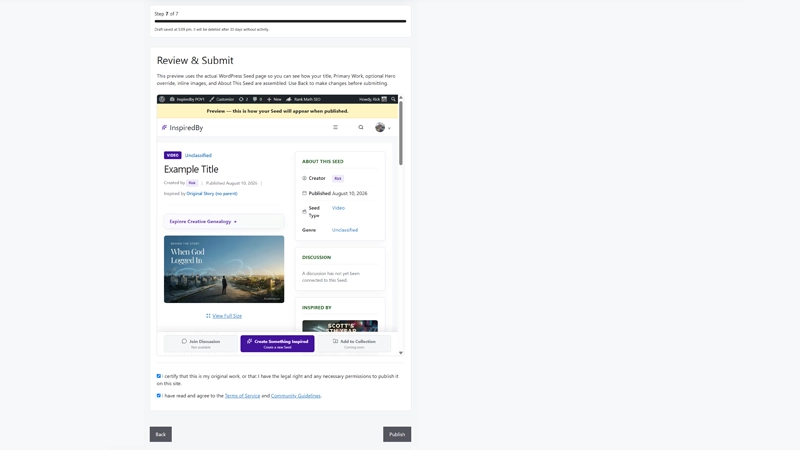
This is your final opportunity to see your completed Seed exactly as visitors will experience it after publication.
For the first time, all of the information you’ve entered throughout the submission process is brought together into a single preview. Your title, creative work, images or media, About This Seed, discovery information, and presentation choices are displayed as one complete Seed.
Take a few minutes to experience it as though you’ve just discovered it for the first time.
Read the title again.
Look at the Hero Image and Discovery Image.
Watch or listen to your media if you’re submitting an Audio or Video Seed.
Read your written work or About This Seed from beginning to end.
Does everything flow naturally? Does it communicate what you intended? Is there anything that feels out of place or unfinished?
One of the advantages of the submission wizard is that you’re never locked into your earlier decisions. If you notice something you’d like to improve, simply click Back until you reach the appropriate step, make your changes, and then continue forward again by clicking Next. Every step is automatically saved as a draft, so you can move backward and forward through the wizard without worrying about losing your work.
Many creators discover small improvements during this final review. You may think of a stronger title, choose a different Discovery Image, improve your excerpt, expand your About This Seed section, or correct something you overlooked earlier. This is exactly what the review step is for.
Before publishing, ask yourself a few simple questions:
- Would this title make me curious enough to click?
- Does my Discovery Image encourage exploration?
- Is my Hero Image creating the first impression I want?
- Does About This Seed clearly communicate the inspiration behind my work?
- If this is a Written Seed, is the opening strong enough to encourage someone to continue reading?
- If this is a Visual, Audio, or Video Seed, does the presentation encourage visitors to experience the work?
Finally, ask yourself one question that captures the purpose of this entire community:
If I discovered this Seed today, would it inspire me to create something new?
If the answer is yes, you’re ready to publish.
Before clicking Publish, you’ll confirm that the work is your own, or that you have the legal right and any necessary permissions to publish it. You’ll also agree to the site’s Terms of Service and Community Guidelines, helping ensure the community remains a welcoming and respectful place for everyone.
After You Publish
Publishing your Seed isn’t the end of the process.
If you later think of a better title, write a stronger excerpt, improve your About This Seed section, replace an image, or make corrections to your work, you can edit your published Seed just as you would any other content on the site.
Creativity evolves, and your Seed can evolve with it.
Tip: It’s easy to focus on finding mistakes during this final review. Instead, try looking at your Seed as a first-time visitor would. Ask yourself one simple question: “Would this make me want to keep exploring?” If the answer is yes, you’re ready to share your work and invite the next creator to continue the creative genealogy.
What Happens Next?
What Happens Next?
Congratulations! Your first Seed is now part of the community.
For some creators, publication happens immediately. In other cases, new submissions may be held briefly for manual review before becoming publicly visible. This helps protect the community from spam, inappropriate content, and accidental misuse while keeping the creative genealogy meaningful for everyone.
If your Seed requires review, don’t worry if you don’t see it immediately after publishing. Most submissions requiring approval are reviewed within 24 to 48 hours. Once approved, your Seed will automatically become visible throughout the site and available for other creators to discover.
Whether your Seed is published immediately or awaiting approval, you can always monitor its progress from your private Profile area. There you’ll find all of your Seeds, along with their current status, including Draft, Pending Approval, and Published.
If you began a Seed but didn’t finish it, you’ll find it there as well. Simply open the draft and continue where you left off. You can also return to published Seeds at any time to improve your title, update your About This Seed section, replace images, refine your excerpt, or make other revisions as your work evolves.
Publishing isn’t the end of your creative process. It’s simply the moment your Seed becomes part of a much larger story.
Your Journey Doesn’t End Here
Every Seed begins with inspiration.
Every published Seed has the potential to inspire someone else.
Today you’ve added another branch to the site’s growing creative genealogy. Tomorrow another creator may discover your work, see something you never intended, and take the idea somewhere completely unexpected. That new creation may inspire another, and another after that, extending the creative journey in ways none of us can predict.
That’s what makes this community different.
It isn’t simply preserving creative works.
It’s preserving the remarkable journey of inspiration between them.
So keep exploring.
Follow creative genealogies.
Join discussions.
Discover ideas outside your own creative discipline.
And when another Seed sparks your imagination, click Create Something Inspired and begin the next chapter in the story.
The next great idea may begin with yours.